AI Video Analytics Cameras: A Michigan SMB Buyer's Guide
AI video analytics turn business cameras into real-time alerts. Costs, edge vs cloud, privacy rules, and use cases for Grand Rapids and West Michigan SMBs.
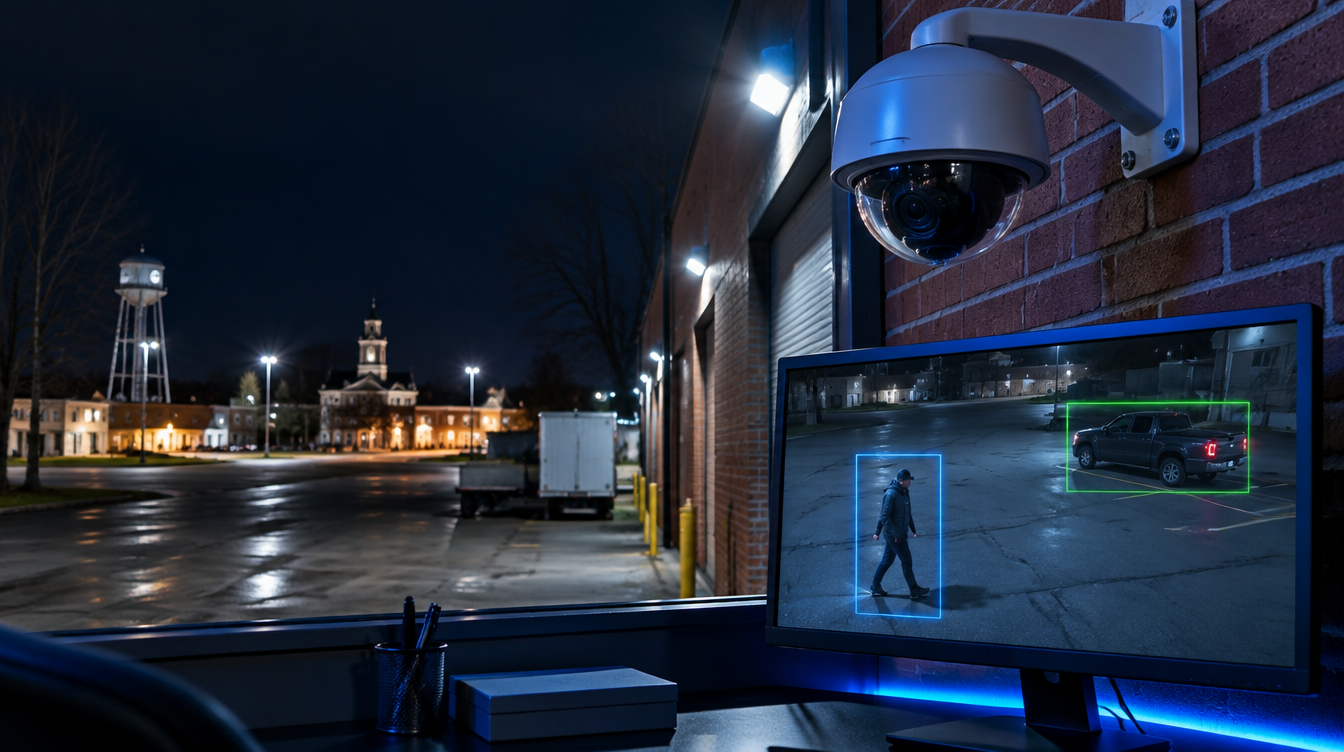
Your cameras recorded the break-in. You found out Monday morning, scrolled through 14 hours of footage, and handed the police a grainy clip of someone in a hoodie. That is how most small business camera systems still work: they record everything and help with nothing until it is too late.
AI video analytics changes that. Instead of storing footage for someone to review later, AI-enabled cameras watch in real time, recognize people and vehicles, ignore blowing leaves and passing headlights, and alert you while something is still happening. For West Michigan manufacturers, medical offices, and multi-site businesses, the shift from "record and review" to "detect and respond" is the biggest change in physical security in 20 years.
What Are AI Video Analytics?
AI video analytics is software that analyzes camera footage automatically to detect specific objects, behaviors, and events, then triggers alerts or actions without a person watching the screen. The AI runs either on the camera itself (edge AI) or in the cloud.
Common capabilities in 2026 business systems include:
- Person and vehicle detection that filters out animals, shadows, rain, and snow, which cuts false alarms dramatically.
- Line crossing and loitering alerts for fence lines, loading docks, and after-hours entrances.
- Natural-language search, so you type "white pickup at the north gate Tuesday afternoon" instead of scrubbing hours of video.
- License plate recognition for parking lots and shipping yards.
- Occupancy and traffic counts for retail, lobbies, and safety compliance.
- Facial recognition for access control or watch lists, which carries privacy obligations covered below.
Some platforms also offer AI weapon detection, which several security vendors expect to become a requirement in public facilities over the next decade.

Edge AI vs Cloud AI: Which Fits Your Business?
The right architecture depends on your bandwidth, number of sites, and how you want to manage the system.
Edge AI processes video on the camera or a local recorder. It works without a strong internet connection and keeps raw footage on site. The tradeoff is that the AI features are tied to the hardware you buy, and upgrades often mean new cameras.
Cloud AI sends video or metadata to a cloud platform for analysis. You get new features through software updates, easy multi-site management, and access from any device. The tradeoff is bandwidth use and a recurring subscription.
Most Grand Rapids businesses we work with land on a hybrid. Cameras do basic detection at the edge, and a cloud platform handles search, alerts, and management across locations. If you have a plant in Holland and an office downtown, one dashboard beats two separate recorders.
One rule applies either way: cameras are network devices. A camera on your flat office network is an open door for attackers. Put cameras on their own VLAN, change default passwords, keep firmware updated, and block cameras from reaching the internet except through the platform they need. Our guide to network segmentation and zero trust walks through the setup.
Real Use Cases for West Michigan SMBs
AI video analytics earns its cost when it solves a specific problem. Here are the use cases we see deliver the fastest payback:
Manufacturing and distribution. Alerts when someone enters the yard after hours, tracks trucks at the dock, and flags people in restricted zones near equipment. A Kent County manufacturer can stop paying for a guard to drive the lot every two hours.
Medical and dental practices. Monitors after-hours entry to medication storage and records areas. Pairs with door access control so a badge swipe and the video clip sit side by side in one log. That helps with HIPAA physical safeguard requirements.
Law and accounting offices. Verifies who entered the file room or server closet and when. Gives you evidence when a client or insurer asks about physical controls.
Multi-site retail and service businesses. Counts traffic, spots loitering near entrances, and lets one manager check five locations from a phone in five minutes.
The common thread is speed. An alert at 2:14 a.m. that a person is at the back door is worth more than perfect footage you find on Monday.

Privacy, Compliance, and Facial Recognition
AI cameras raise legitimate privacy questions, and facial recognition raises the most. Illinois, Texas, and Washington have biometric privacy laws with consent and retention rules, and Illinois allows private lawsuits with steep per-violation damages. Several other states, Michigan included, have seen biometric privacy bills introduced. If you have employees, customers, or locations across state lines, those rules can apply to you.
Practical guardrails for any AI camera deployment:
- Post clear signage that video monitoring and analytics are in use.
- Write a retention policy. Most businesses keep footage 30 to 90 days unless an incident requires longer.
- Limit who can view and export video, and log every export.
- Turn off facial recognition unless you have a clear purpose and have reviewed notice and consent rules with counsel.
- Vet the vendor's security. Ask where video is stored, how it is encrypted, and whether the vendor has had breaches.
We cover the legal side in more depth in our post on facial recognition cameras and Michigan privacy rules. For broader physical security guidance, CISA's physical security resources are a solid starting point.
What AI Camera Systems Cost
Budget ranges vary by camera count, storage, and platform. As a rough guide for a 20 to 30 camera deployment at a Michigan SMB:
- Cameras: $300 to $1,200 each for business-grade AI-capable units, depending on resolution and lens.
- Cloud platform licensing: often $10 to $40 per camera per month, depending on retention and features.
- Installation and cabling: varies widely with building age, ceiling height, and existing cable runs.
Ask every vendor for the total cost over five years, not just the hardware quote. A cheap camera with an expensive per-camera subscription can cost more than a pricier camera with included analytics. Also ask whether existing cameras can be added to the platform, since some cloud systems support older IP cameras.
Frequently Asked Questions
What is AI video analytics for business security cameras?
AI video analytics is software that watches camera feeds automatically and detects people, vehicles, and unusual behavior in real time. Evolving Technology Solutions deploys these systems so Michigan businesses get instant alerts and searchable footage instead of hours of video nobody reviews.
Do I need to replace my existing cameras to get AI features?
Not always. Many cloud platforms support existing IP cameras and add analytics through software or a small on-site appliance. Evolv typically audits your current cameras first and only recommends replacing units that are too old, too low-resolution, or impossible to secure.
Are AI security cameras a cybersecurity risk?
They can be if they are installed on your main business network with default settings. Evolving Technology Solutions places cameras on segmented VLANs, enforces strong credentials, and manages firmware updates so your camera system does not become an entry point for attackers.
Is facial recognition legal for businesses in Michigan?
Michigan does not currently have an Illinois-style biometric privacy statute, but bills have been introduced and other states' laws can apply if you operate across state lines. Evolv recommends clear signage, a written retention policy, and a legal review before turning on facial recognition. Confirm current requirements with your attorney.
How long does it take to install an AI camera system?
Most small and mid-sized deployments in Grand Rapids and West Michigan take one to three weeks from site survey to go-live, depending on cabling needs. Evolv handles the network design, installation, and configuration as one project so cameras, access control, and IT security work together.
Make Your Cameras Work for You
If your cameras only help after something goes wrong, you are paying for a system that is not doing its job. AI video analytics turns cameras into an early warning system, cuts false alarms, and makes footage searchable in seconds.
Evolving Technology Solutions designs and installs secure AI camera and access control systems for businesses across Grand Rapids and West Michigan, built on properly segmented networks and backed by our managed security services. Book a free site assessment at evolvtechsolutions.com and we will show you what your current system misses.
Get started
Ready to take the next step?
One technology partner for managed IT, cybersecurity, cloud, software and AI. Pick the way you'd like to start.
- Book a consultationA short call about what you run and where it hurts.Book now
- Free security assessmentA written report on what to fix now and what can wait.Start
- Request a proposalScope a project, a migration or a managed service.Start
Prefer to talk now? (616) 243-2234